
When paying your PrimeMLS invoices, all customers have the ability to store credit card information or set up auto-pay. This page includes details on how to set up both options. All payments to PrimeMLS must be completed via electronic payment method.
TABLE OF CONTENTS
Setup AutoPay
Setting up autopay ensures your PrimeMLS invoices will be paid on time and without hassle! Review the details below to learn how to set that up.
Please Note: Autopay is pulled 7 days prior to the invoice due date for quarterly incoices in order to allow for correction of expired cards or declined payments.
Step 1: Log In
- Log into your PrimeMLS Dashboard via myprimemls.com.
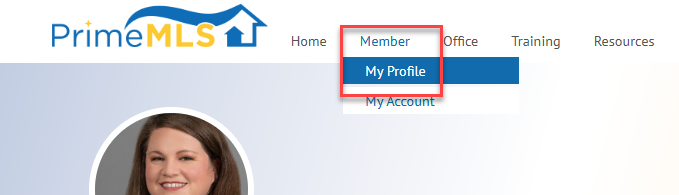
- From the Dashboard, click the "Member" tab and select "My Profile."
Step 2: Choose Payment Type
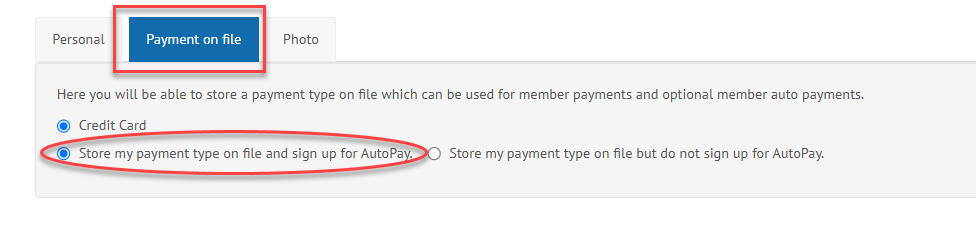
- Select "Payment on File."
- Select "Store my payment type on file and sign up for AutoPay."
Step 3: Enter Debit/Credit Card Information
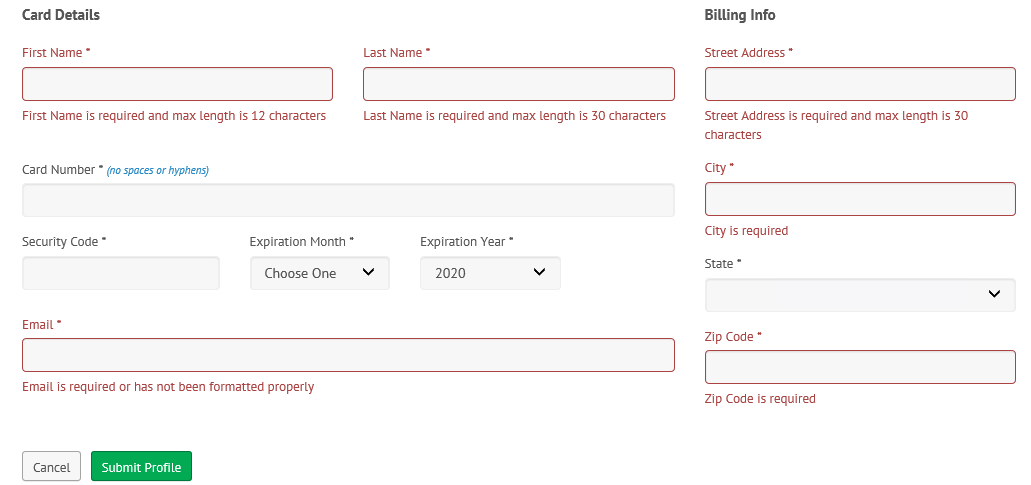
- Enter your payment information, some of which may be auto-filled based on your customer profile details. Information that is auto-populated can be changed, if necessary.
- Note: the following payment types are available: American Express, Discover, MasterCard, or Visa.
- A unique email address is required. You will receive a duplicate email error message if your email address is shared with another user or linked to a different payment profile. You must provide a different, unique email address to proceed.
- When you've entered all required details, click "Submit Payment."
Storing Payment Information
Storing payment information helps to make the payment process faster!
Step 1: Log In
- Log into your PrimeMLS Dashboard via myprimemls.com.
- From the Dashboard, click the "Member" tab and select "My Profile."
Step 2: Choose Payment Type
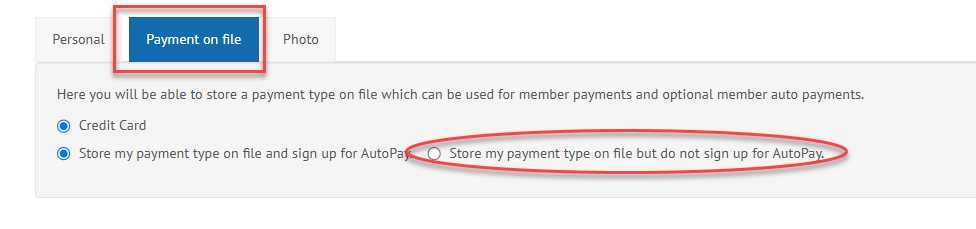
- Select "Payment on File."
- Select "Store my payment type on file but do not sign up for AutoPay.
Step 3: Enter Debit/Credit Card Information
- Enter your payment information, some of which may be auto-filled based on your customer profile details. Information that is auto-populated can be changed, if necessary.
- Note: that the following payment types are available: American Express, Discover, MasterCard, or Visa.
- A unique email address is required. You will receive a duplicate email error message if your email address is shared with another user or linked to a different payment profile. You must provide a different, unique email address to proceed.
- When you've entered all required details, click "Submit Payment."