
This guide is for office brokers and office admins. In those roles, you have the ability to modify the settings to control how leads are handled from the PrimeMLS Public Websites to your office. Without updates, leads go directly to the list agent's email inbox; however, brokers and admins can make updates to that process.
OFFICE SETTINGS FOR CLAIMING LEADS
Office Settings Options
Step 1: Access Office Settings
From the PrimeMLS Dashboard, choose "PrimeMLS.com Leads & Analytics" or "Commercial.PrimeMLS.com Leads & Analytics."
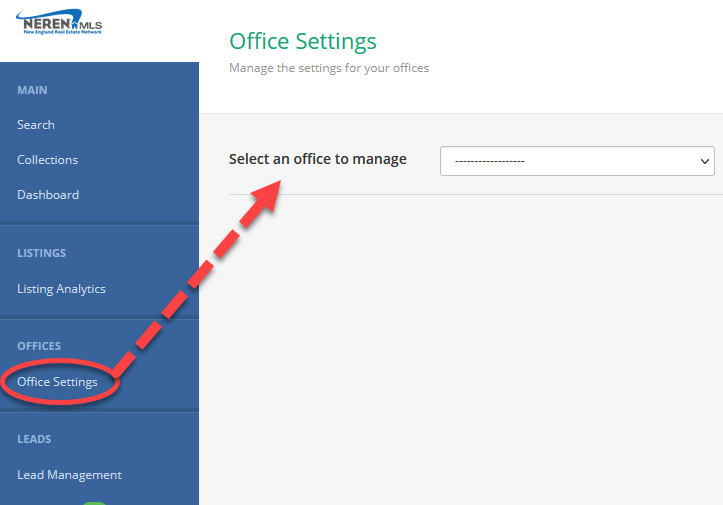
When your member side dashboard opens, from the blue panel on the left, choose "Office Settings."
If you manage multiple offices, select the office you want to update from the drop-down menu.
Step 2: Select Lead Routing
Within Lead Routing, there are 3 options:
Listing Agent: selecting this means leads will go directly to the list agent. Leads do not have to be actually "claimed." The information will be included in an email to the list agent for them to then contact the lead.
Lead Pool: selecting this means that all incoming leads will go to the list agent and they will have an allotted time to claim the lead. If it goes unclaimed, it falls into a pool made available for all agents in the office to claim.
Custom: selecting this means you can enter an email address to override where leads will be sent, then dispersed accordingly by the designated person in the office.
More About Leads Pools
This section becomes available if you have selected "Lead Pool" for the Lead Routing option.
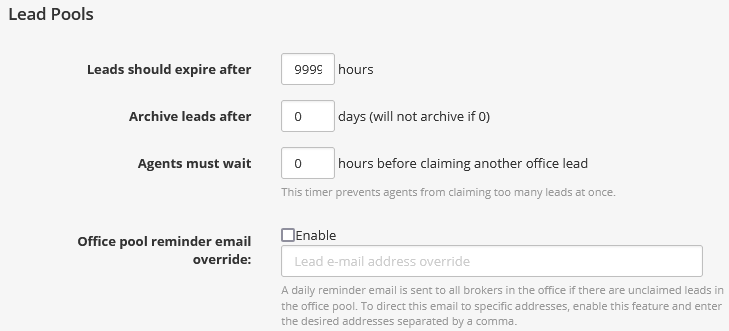
Leads should expire after: the default is 9999, which means the leads will not expire. If you change this, the list agent will have that designated time to claim the lead. After that it will fall into the "Office Leads" section of "Lead Pools" where every agent in the office will have the opportunity to claim the lead.
Archive leads after: the default is 0, which means leads will not archive. An archived lead is one that goes unclaimed from Office Leads after the number of days set here.
Agents must wait: the hour time set here will prevent an agent from immediately claiming every lead in the "Office Leads" section. The default is 0. If this is changed to 1, for example, an agent could claim 1 lead from Office Leads, then another after an hour.
Office pool reminder email override: enable this and enter an email address that will be notified daily of unclaimed leads in the office pool to ensure leads get claimed.
More About Custom Settings
This section becomes available if you have selected "Custom" for the Lead Routing option. Enter an email address into the "Leads email override" field. This will direct all leads from listings in your office to a centralized email address for a designated person to then disperse according to office policy.
