
Quick Links are not strictly a home page feature; in fact, your Quick Links are available no matter where you are working within Paragon! You can set up to 6 Quick Links, which provides you with one-click access to your most-used system functions. Watch the video to learn how to take advantage of this feature, or follow the instructions below.
Setting Quick Links
Step 1: Find Quick Links
- At the very bottom of the Paragon screen are Quick Links.
- You'll find a couple set by default.

Step 2: Add Quick Links
- Tap the gear icon in the bottom right corner of Paragon.
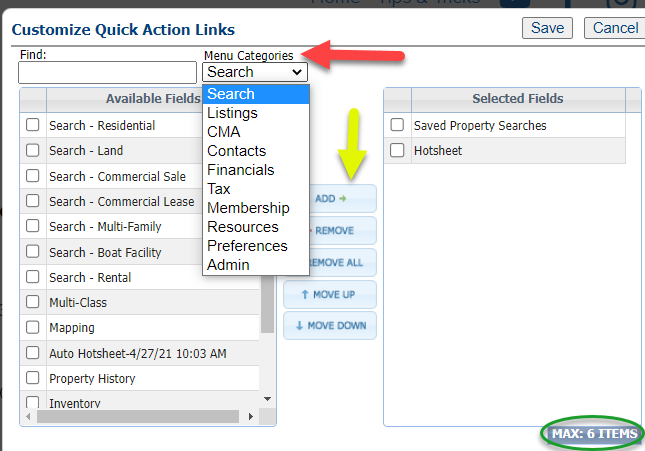
- The Available Fields chart are the various sections that can be added.
- Use the Menu Categories drop-down to switch between system features.
- Double-click on each feature you want to add, or select multiple and use the "Add" button.
- Remove any by double-clicking from the Selected Fields chart.
- Note that the maximum number of features is 6.
Step 3: Save your changes
- Once you've added your top features, click "Save."
- Now you've got fast access to your top 6 Paragon functions!