
The Collaboration Center for buyers is a portal for them to review listings they are receiving from the system. They can favorite listings, mark others as possible or reject listings. They can add comments and requests showings, which go directly to their agent. They can compare listings and more. All of this can be done on any device, as the portal is entirely mobile friendly. This page covers how to utilize Agent Recommended. Agent recommended is a feature that allows agents to manually add listings into their buyer's Collab Center that they otherwise wouldn't receive automatically.
USING AGENT RECOMMENDED
Enabling Agent Recommended
The purpose of the Collaboration Center is for agent's to set up a saved search from criteria the buyer provides and the system automatically sending matches based on that saved search. However, agents will still run searches and may come across a listing that doesn't match the criteria, but could still be worth seeing by the buyer. Agent Recommended allows agents to add those listings into the Collab Center.
Step 1: Find the Contact
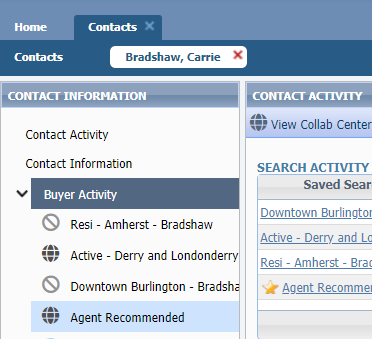
Go to the "Contacts" menu and select "View/Manage Contacts."
Click the contact's name to open their profile.
From the menu on the left, choose "Buyer Activity."
Step 2: Enable Agent Recommended
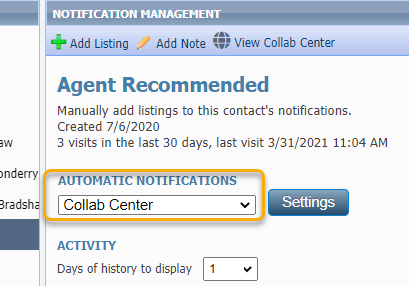
From the menu on the left, choose "Agent Recommended."
This automatically turns on the Agent Recommended feature.
Adding Listings via Agent Recommended
Step 1: Find listings
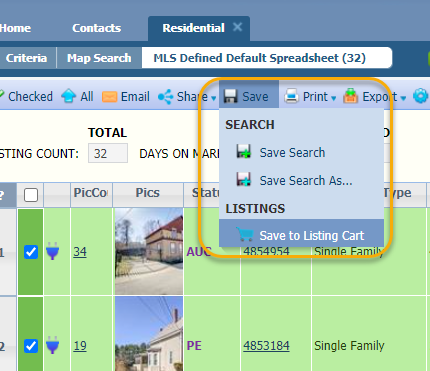
When you are running a search and find listings that may work for a buyer, select the listings.
Click "Save"
Choose "Save to Listing Cart."
Step 2: Add to Cart
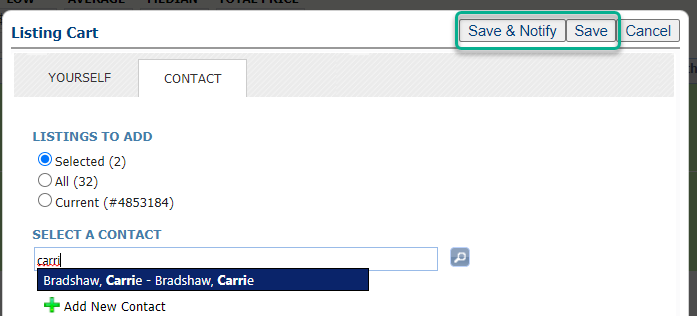
Select "Contact"
Type the name of the contact and select it as it appears.
If you are not sure if Agent Recommended is enabled for this contact, choose "Save & Notify." This will add the listing to the contact and open up their profile for you to ensure Agent Recommended is enabled. Refer to the instructions above for how to do that.
If you are sure Agent Recommended is enabled, click "Save."
The listings will be emailed to the buyer. They will also be added to the Collab Center in a section called "Agent Picks." This way the buyer knows their agent specifically found these listings for them.