
The Data Authorization section of Listing Maintenance in Paragon is where agents can select where their listings display outside of the MLS Database. Within Listing Maintenance there is also a section for virtual tours with a few options, including a free virtual tour option!
JUMP TO A SECTION:
Data Authorizations
In addition to the PrimeMLS public websites and IDX sites (which includes Zillow, Trulia and Homes.com), you and your seller have the option to send listings to a myriad of third-party sites. This guide breaks down what each of these fields mean, but don't forget that in listing maintenance you can click the blue question mark, which will explain what selections of "Yes" or "No" will do.
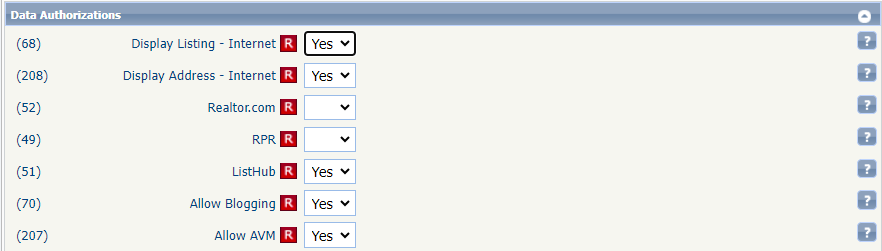
Display Listing - Internet | Defaulted to "Yes;" selection of "No" means the listing will display only within the PrimeMLS database and not included in data feeds for public display on the internet. |
Display Address - Internet | Defaulted to "Yes;" selection of "No" will hide the address from display in PrimeMLS IDX member sites and also relayed to any non-MLS 3rd party sites that you may have chosen to send your listing to for public display, which are asked to honor the setting indicated in this field. The address will display in the PrimeMLS database. |
Realtor.com | Includes or withholds the listing from the PrimeMLS data feed for display on Realtor.com. The "Display Listing - Internet" field must be set to "Yes" to permit display on Realtor.com.* |
RPR | Includes or withholds the listing from the PrimeMLS data feed to the NAR RPR site. "Display Listing - Internet" field must be set to "Yes" to be included in the data feed to RPR.* For more information, visit the RPR website. |
Costar/Apartments.com | This selection is applicable to Rental listings only. Includes or withholds the listing from the PrimeMLS data feed to Apartments.com. "Display Listing - Internet" field must be set to "Yes" to be included in the data feed to Apartments.com.* |
Zillow Group Rentals | This selection is applicable to Rental listings only. Includes or withholds the listing from the PrimeMLS data feed to Zillow Rentals. "Display Listing - Internet" field must be set to "Yes" to be included in the data feed to Zillow Rentals.* |
ListHub | If your office has an agreement in place with ListHub, selecting "Yes" allows your listing to be distributed to the websites designated by your broker in the office's ListHub agreement. |
Allow Blogging | Defaulted to "Yes;" selection of "No" indicates that the seller wishes to disable display of comments about the listing on PrimeMLS member sites. This setting does not impact display of comments on non-MLS 3rd party sites. |
Allow AVM | Defaulted to "Yes;" selection of "No" indicates that the seller wishes to disable the display of an automated estimate of market value (AVM) and exclude any hyperlinks to an estimate on PrimeMLS member sites. This setting does not impact AVM display on non-MLS 3rd party sites. |
*For these switches, your broker has the option to select "Yes" or "No" for the office. If your office broker has set any of these options to "No," then listings will not be included in the data feed to those sites.
Virtual Tours
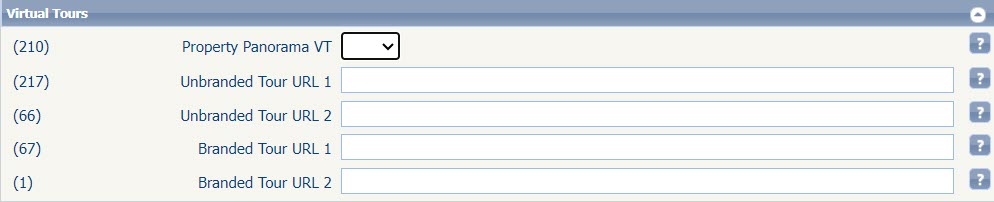
Property Panorama VT | Property Panorama is a member benefit brought to you for free. Upon selecting "Yes" a virtual tour will be generated within about 24 hours of when the listing is live in the PrimeMLS database. You must have uploaded at least 3 photographs to the listing. From the PrimeMLS Dashboard, you can access your free Property Panorama account to further edit your virtual tours. |
Unbranded Virtual Tour URL 1 & 2 | You can add up to 2 unbranded virtual tours. Type or paste the URL here. Tour links added to either of these fields will display in the PrimeMLS Database and be included in the data feed to IDX and third-party sites. |
Branded Virtual Tour URL 1 & 2 | You can add up to 2 branded virtual tours. Type or paste the URL to your branded tour here. Branded Tours include any reference to you or your office, photos of you or office, contact information for you or the office, your voice, and also includes link URL's and usernames that refer to the office or agent. This tour displays on the PrimeMLS Public websites and third-party websites. It will not display within the PrimeMLS database or on IDX sites. |