
In Paragon, you are able to clone your own inventory and within the same class. Watch the video to learn how or follow the below instructions.
Cloning Listings
Step 1: Find the listing
Open the Listings menu and choose "Listings."
Find the listing you wish to clone by filtering by status or class or searching by MLS number or address.
Step 2: Clone
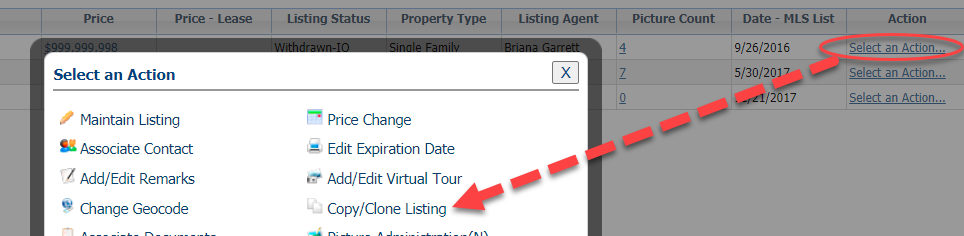
From the spreadsheet of listings, click "Select an Action," which is the last column of the grid.
Choose "Copy/Clone Listing."
Step 3: Finish new listing
This opens a copy of the listing you are cloning.
Make any necessary or required changes, for example if you wanted to clone a Residential - Single Family to a Condo, open the Property Type field to choose "Condo." Other fields may become required based on the selection of Condo.
When all information is complete, click "Save" and choose "Save Listing."
- The original listing that you copied will remain and you'll also have the new listing.
Important Note: Both listings must be updated accordingly to reflect accurate statuses. Condos, Mobile Homes, and Multi-Family properties should be closed in their respective categories regardless of what property class/type under which they were also marketed. The other listing should be emailed to support@primemls.com to be deleted from the system.