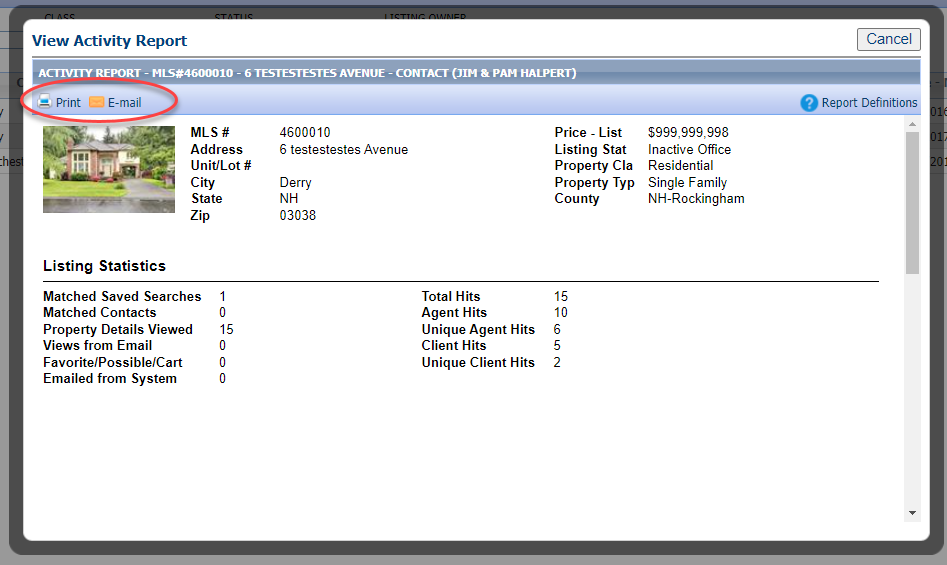
The Listing Activity Report is available on all listings for list agents to review and share with their sellers. It includes statistical data and the below video covers how to find it and breaks down what each statistic means. Additionally, Seller Activity is available. Seller Activity provides the same information, plus more, to your sellers on an automated basis via the Collaboration Center. For a video and instructions on that awesome feature, refer here.
LISTING ACTIVITY REPORT
How to Access the Listing Activity Report
Step 1: Find the listing
Go to the Listings menu
Select Listings
Find the listing for which you want stats by filtering by status or class, or searching by address or MLS number.
Step 2: Access report
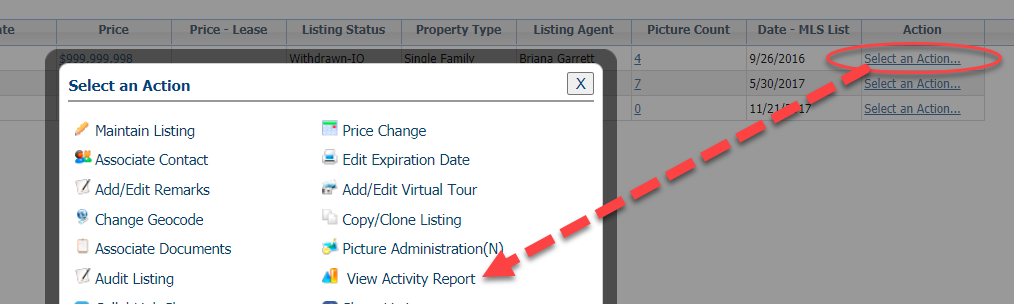
Once you find the listing, click "Select an Action," which is the last column on the spreadsheet.
In the pop-up, choose "Listing Activity Report."
Step 3: Review and Share
- Review this information and you can share it, as well.
- Click "Print" to print the report
- Click "Email" to share it as an attachment via email.